








Logo SwingFlow

SwingFlow®

Sign in

Choose your space.

SwingFlow adapts to your role. Start as a coach to manage players, or as a player to follow your own journey.

SwingFlow coach space preview

space

coach

Manage your players, structure your sessions, and follow their progress.

They trust us

  • Golf National Junior Club
  • Centre de formation ffgolf
  • Association Sportive Golf Marcilly
  • DG Golf
  • Ligue de Golf de Normandie

SwingFlow brings students, sessions, reports, and data together in one space, without replacing your specialist tools. For the independent coach, the golf school, and the club.

Golf coach on the course

Report published

Sent to the student and their parent

Next session

Thursday 2:00 pm, at the range

The student record

Reports, sessions, official results, calendar, and conversations are filed in the student’s record, in the order they happen.

Jack Martin

Student record

  1. Vertical force measured

    Data imported after the session

    Apr 1

  2. Body screening

    4 points to work on, 6 acquired

    Mar 26

  3. Work block: bunker

    3 drills, 1 stage validated

    Mar 22

  4. Swing session

    Report published to the student

    Mar 18

The cycle of a session

  1. Before the session

    You pick up the thread

    The student’s timeline gathers reports, tests, data, and notes, in order.

    Jack Martin

    Student record

    1. Vertical force measured

      Data imported after the session

      Apr 1

    2. Body screening

      4 points to work on, 6 acquired

      Mar 26

    3. Work block: bunker

      3 drills, 1 stage validated

      Mar 22

    4. Swing session

      Report published to the student

      Mar 18

  2. During the session

    You keep the record

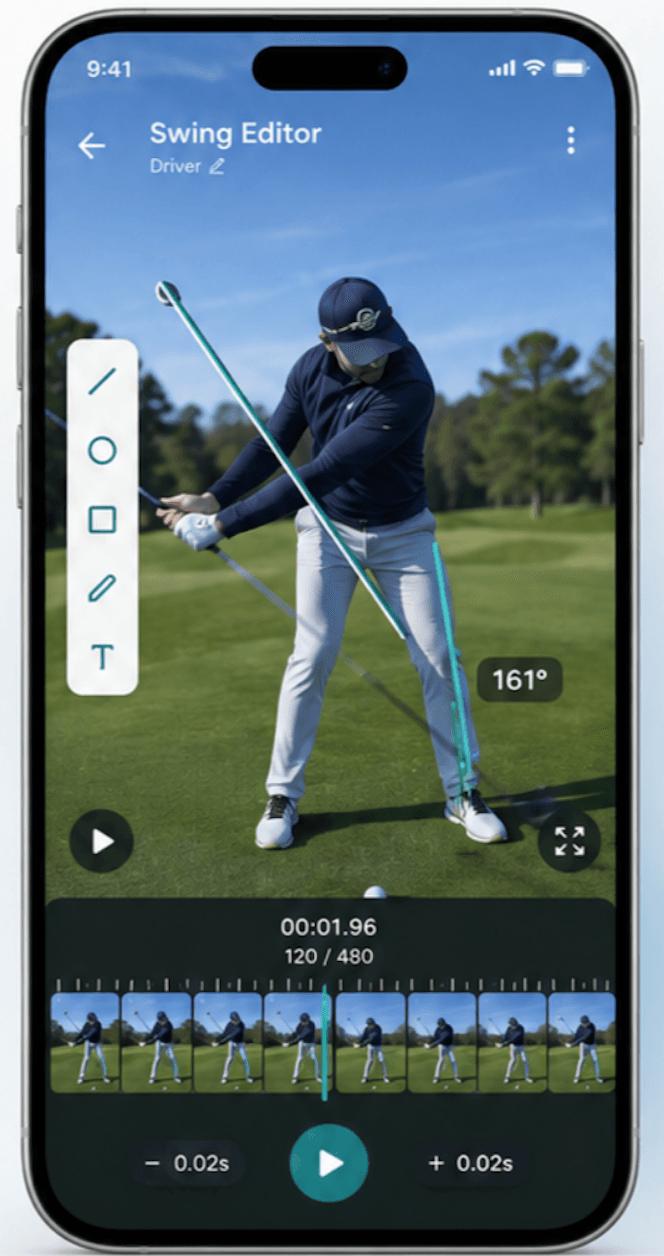
    Notes, videos annotated in the Swing Editor, standardized tests, and data from your devices, imported from a file or a screenshot.

    Swing Editor on a phone: a swing annotated frame by frame, with lines and an angle measurement.
  3. After the session

    The report reaches the student

    A guided flow to write it, an AI proofread if you want one, then publication to the student and their parent.

    Swing session, March 18

    • Findings

    • Work of the day

    • Before the next session

    Published to the student

  4. Between sessions

    The student keeps working

    Training prepared for them, messaging, and the tournament calendar: follow-up does not stop at the range.

    Training for the week

    • Putting routine from 3 m
    • Wedging 40 to 60 m
    • 9 holes on their own

    Jack

    Routine done this morning, thanks coach.

Create my coach account

Golf schools, clubs, academies

A shared space for your coaches, your groups, and families. Everyone sees what concerns them, and each student keeps a single record.

Groups and subgroups
Junior beginners, golf school, teams: place students and assign one or several coaches to each group.
Team and access rights
Coach, volunteer, competition manager: you choose who can view and who can edit, by activity and by group.
Parents kept informed
In the Parent space, families follow their child’s calendar, reports, and messages, and answer attendance requests.
Golf school season
The Golf School module prepares the season step by step: registrations, class calendar, attendance sheets, and internal competitions.

An organization space is created with our team. Write to us to prepare yours.

Club groups

2026-2027 season

  • Golf school

    22 students, 2 coaches

    • U10 Wednesday
    • U12 Saturday
  • Teams

    16 students, 1 coach

    • Women
    • Men
  • Talent scouting

    6 students, 1 coach

    • County squad
  • Camps

    9 students, 1 coach

    • Spring break

Team and access

  • ClaireAdministrator
  • HugoCoach
  • SamiVolunteer, attendance

SwingFlow centralizes, organizes, and contextualizes information from your specialist technologies.

Modern golf coaching relies on specialized technologies like Sportsbox, TPI, Trackman, or HackMotion. SwingFlow helps coaches centralize, organize, and contextualize information they are authorized to use.

Each technology remains the reference for its own analysis.

  • Launch monitors
  • Biomechanics
  • Force & pressure
  • Screenings
  • Video
  • Coach notes

Student timeline

Import from a file or a screenshot

“The speed of product progress, its ability to aggregate data, and its ease of use impress me every day. Whether for individual, group, or academy follow-up, it saves me a huge amount of time.”

Roman Lissowski

Team coach - Golf de Marcilly

More than 10 years with Marcilly teams at the highest national level.

Create your coach account, add a student: their record fills in from the first session.